
Crown Tooth Scroll Saw Blades: Material Matching Guide
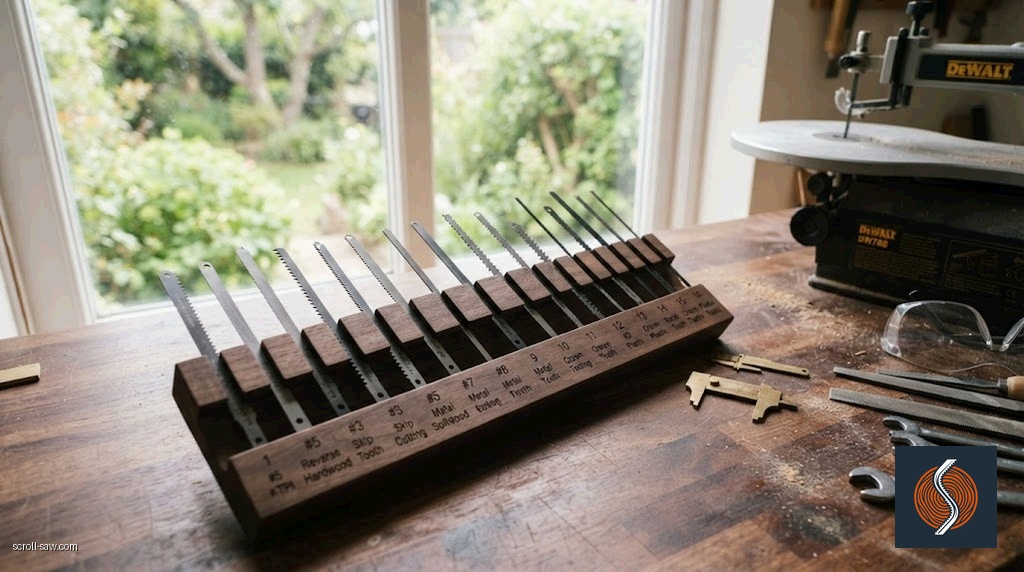
Crown Tooth Scroll Saw Blades: Match Blade Number to Material and Thickness
You clamp a standard skip-tooth blade into your scroll saw, feed a piece of acrylic into it, and within two inches of cutting the plastic starts to melt and fuse back together behind the blade. The kerf closes up, the blade grabs, and you have a ruined piece of acrylic with a scorched groove in it. That is chip welding, and it is the single biggest problem with cutting plastics on a scroll saw. Crown tooth scroll saw blades exist specifically to solve it.
Crown tooth scroll saw blades have teeth that point in both directions (up and down) along the entire length of the blade. Unlike a reverse-tooth blade, which only has a short section of upward-facing teeth at one end, a crown-tooth blade has bidirectional teeth throughout. This means the blade cuts on both the downstroke and the upstroke continuously, which keeps the kerf open, reduces heat buildup, and prevents the plastic from re-fusing behind the cut. For acrylic, polycarbonate, Plexiglas, and other thermoplastics, crown-tooth blades are the difference between a clean cut and a melted mess.
The question is which crown-tooth blades to buy and how to match the blade number to the material and thickness you are cutting. The answer comes down to understanding how the universal blade numbering system, teeth per inch, blade width, and blade thickness interact with the specific plastic or material in front of you.
What Makes Crown-Tooth Geometry Different
On a standard skip-tooth blade, all teeth point downward. The blade cuts on the downstroke, and the upstroke is a recovery stroke that does not cut. On a reverse-tooth blade, most teeth point downward but a short section at the bottom end points upward to clean the bottom face. On a crown-tooth blade, teeth alternate up and down along the entire blade.
This bidirectional cutting has two effects that matter for plastics. First, the kerf is cut from both sides simultaneously, so there is no moment when the kerf is only partially open. Plastic cannot weld back together because the blade is always actively cutting both walls of the kerf. Second, the bidirectional action distributes heat more evenly across the blade, so the blade runs cooler. Heat is what causes chip welding, so reducing heat directly prevents the problem.
Crown-tooth blades also work well on other materials that benefit from bidirectional cutting: thin metal, hard composites, and materials that tend to splinter or fray on one face. Some scroll sawyers use them for cutting Corian and similar solid surface materials.
Matching Blade Number to Material Type
The universal blade numbering system gives you a quick reference for blade size. Smaller numbers (like #2/0, #0, #1) mean finer blades with more teeth per inch. Larger numbers (like #7, #9, #12) mean coarser blades with fewer teeth per inch. The right blade number depends on what you are cutting and how thick it is.
For Acrylic and Plexiglas (1/8 inch to 1/4 inch)
For thin acrylic sheet (1/8 inch to 1/4 inch), a #2 or #3 crown-tooth blade works well. These blades have around 18 to 25 teeth per inch, which is fine enough to produce a smooth edge on acrylic without grabbing. The blade width is narrow enough (0.040 to 0.050 inches) to follow curves, and the bidirectional cutting prevents chip welding.
Feed slowly. Acrylic melts at a relatively low temperature, and even with a crown-tooth blade, feeding too fast generates enough heat to cause problems. Let the blade cut at its own pace, and if you see the acrylic starting to gum up behind the blade, slow down further.
The honest drawback: crown-tooth blades in this size range are fragile. The bidirectional tooth pattern means there is less blade body material between teeth, so the blade is more prone to breaking than a skip-tooth blade of the same size. Expect to replace blades more frequently when cutting acrylic.
For Polycarbonate and Polycarbonate Blends (1/4 inch to 1/2 inch)
Polycarbonate is tougher than acrylic and tends to gum up more aggressively. For 1/4-inch to 1/2-inch polycarbonate, a #5 crown-tooth blade is a good choice. With around 11 to 12 teeth per inch and a thicker body, it has the stiffness to handle the tougher material without deflecting.
The larger teeth and gullets on a #5 clear the gummy chips that polycarbonate produces more effectively than a finer blade. The bidirectional cutting keeps the kerf open even as the plastic tries to fuse behind the blade.
The tradeoff: the #5 crown-tooth leaves a slightly rougher edge than a #3. You will need to sand or flame-polish the cut edges. On visible edges, plan for finishing time.
For Thick Acrylic and Solid Surface Materials (1/2 inch to 1 inch)
For thick acrylic (1/2 inch to 1 inch) and solid surface materials like Corian, a #7 or #9 crown-tooth blade provides the cutting power needed. These blades have 7 to 10 teeth per inch and thick, stiff bodies that resist deflection in deep cuts.
The large gullets clear the volume of chips that thick material produces, and the bidirectional cutting prevents chip welding even in deep kerfs. For Corian and similar materials, the crown-tooth geometry is especially valuable because these materials heat up quickly and can crack if the kerf closes.
The flaw: at this size, the cut surface is noticeably rough. You will need to sand every edge, and the wide kerf (around 0.025 to 0.030 inches) removes more material than you might expect. On precision-fit work, account for the kerf in your layout.
For Thin Plastic Sheet and Model Materials (under 1/8 inch)
For very thin plastic sheet (under 1/8 inch), a #2/0 or #0 crown-tooth blade gives you the finest cut available. With 25 to 28 teeth per inch and a blade width of about 0.030 inches, it produces a nearly smooth edge on thin acrylic and styrene.
This blade is for model making, sign work, and any project involving thin plastic components. The fine teeth produce minimal chipping on thin material, and the bidirectional cutting prevents the edges from melting and fusing.
The limitation: these blades are extremely fragile and break easily. They are also slow cutting, so patience is essential. Do not use them on material thicker than 1/8 inch because the fine teeth cannot clear enough chips.
For Wood Where Both Faces Must Be Clean
Crown-tooth blades are not only for plastics. Some scroll sawyers use them for wood when both faces of the cut need to be clean and a reverse-tooth blade is not enough. Because crown-tooth blades cut in both directions along the entire blade length, they produce less tearout on both faces than any other geometry.
A #5 crown-tooth blade in 1/2-inch hardwood produces a cleaner surface on both faces than a #5 skip-tooth or even a #5 reverse-tooth. The tradeoff is cutting speed: crown-tooth blades cut slower than skip-tooth blades because the bidirectional teeth create more resistance. They also vibrate more, which can cause chatter on lightweight saws.
For most wood projects, skip-tooth or reverse-tooth blades are the better choice because they cut faster and the surface quality is good enough. But for special pieces where both faces must be flawless and sanding is not an option, a crown-tooth blade is worth the slower cutting speed.
How TPI and Blade Thickness Interact on Crown-Tooth Blades
On crown-tooth blades, the relationship between TPI and blade thickness is slightly different than on skip-tooth blades. Because teeth point in both directions, the effective chip clearance per direction is roughly half what you would get on a skip-tooth blade of the same TPI. That means crown-tooth blades need a slightly lower TPI than skip-tooth blades for the same material thickness.
For example, a #5 skip-tooth blade at 12 TPI handles 3/4-inch wood well. A #5 crown-tooth blade at 12 TPI might struggle in 3/4-inch material because the bidirectional teeth reduce chip clearance per direction. You might need to drop to a #7 crown-tooth at 10 TPI for the same material.
This is a subtle point that many scroll sawyers learn through trial and error. If your crown-tooth blade is burning or loading up in material that a skip-tooth blade of the same size handles fine, step up one blade size.
Blade Width and Minimum Cutting Radius
Crown-tooth blades follow the same relationship between blade width and minimum cutting radius as other blade types. A narrower blade can make tighter curves. A wider blade needs a larger radius.
A #2/0 crown-tooth at 0.030 inches wide can turn a radius of about 1/16 inch. A #7 crown-tooth at 0.090 inches wide needs a radius of about 1/2 inch. For most plastic cutting, the curves are not extremely tight, so a #5 crown-tooth at 0.070 inches wide (minimum radius about 3/8 inch) is a good general choice.
Pin-End vs Plain-End Crown-Tooth Blades
Crown-tooth blades are available in both pin-end and plain-end formats, though the selection is more limited than for skip-tooth or reverse-tooth blades. Not all manufacturers produce crown-tooth blades in pinned format.
If you need a pinned crown-tooth blade, look for 5 inch pin end crown tooth scroll saw blade options from manufacturers like Olson. The pinned format limits you to thicker, wider blades, but the crown-tooth geometry still provides the bidirectional cutting that prevents chip welding.
Plain-end crown-tooth blades give you access to the full range of sizes, from #2/0 to #9. If your saw accepts plain-end blades, this is the better option for plastic work because you can match the blade size precisely to your material thickness.
Tips for Getting Better Cuts in Plastics
Beyond blade selection, a few techniques improve your results when cutting plastics with crown-tooth blades.
First, slow your saw speed. Most scroll saws have variable speed, and plastics benefit from a slower stroke rate. High speed generates more heat, and heat causes chip welding. Start at a medium speed and reduce if you see any melting.
Second, use a lubricant. A wax stick applied to the blade reduces friction and heat. Some scroll sawyers use a light mist of soapy water, but be careful with this on saws that are not designed for liquid cooling.
Third, remove the protective film from both sides of the acrylic before cutting. The film can grab the blade and cause it to wander. If you need the film for layout marks, peel it back from the cut line only.
Fourth, practice on scrap. Every plastic behaves slightly differently, and the feed rate that works perfectly on one brand of acrylic may be too fast for another. Cut a few inches of scrap to dial in your speed before committing to the real piece.
Safety Considerations for Plastic Cutting
Cutting plastics produces fine particles that can be harmful when inhaled. The National Institute for Occupational Safety and Health has documented respiratory risks from plastic dust and fumes. Use dust collection, work in a ventilated area, and wear a mask.
The Occupational Safety and Health Administration standard 29 CFR 1910.213 covers woodworking machinery safety, and those requirements apply to scroll saw work regardless of material. Keep guards in place, maintain blades in good condition, and wear eye protection. Acrylic fragments can be sharp, so handle cut pieces with care.
Comparison of Crown-Tooth Blade Sizes
| Blade | Size | TPI | Best Material | Thickness Range | Min. Radius |
|---|---|---|---|---|---|
| Fine | #2/0 or #0 | 25 to 28 | Thin plastic, styrene | Under 1/8 in | ~1/16 in |
| Detail | #2 or #3 | 18 to 25 | Acrylic, Plexiglas | 1/8 to 1/4 in | ~3/16 in |
| General | #5 | 11 to 12 | Polycarbonate, wood | 1/4 to 1/2 in | ~3/8 in |
| Heavy | #7 | 9 to 10 | Thick acrylic, Corian | 1/2 to 3/4 in | ~1/2 in |
| Rough | #9 | 7 to 8 | Solid surface, thick stock | 3/4 to 1 in | ~5/8 in |
Conclusion
Crown tooth scroll saw blades are the answer to chip welding and tearout on plastics, acrylics, and solid surface materials. The bidirectional tooth geometry keeps the kerf open, reduces heat, and prevents the material from fusing behind the blade. Match the blade number to your material: a #2/0 or #0 for thin sheet, a #2 or #3 for acrylic, a #5 for polycarbonate and general plastic work, a #7 for thick acrylic and Corian, and a #9 for heavy stock. Slow your saw speed, use a lubricant, and let the blade cut at its own pace. With the right blade and the right technique, you can cut plastics on a scroll saw without melting, fusing, or ruining your material.
FAQ
What are crown tooth scroll saw blades used for? Crown-tooth blades are designed primarily for cutting plastics and acrylics, where chip welding (the plastic melting and fusing behind the blade) is a problem. The bidirectional teeth keep the kerf open and reduce heat. They also work well on solid surface materials like Corian and on wood when both faces need to be exceptionally clean.
Can crown tooth blades cut wood? Yes, crown-tooth blades cut wood effectively and produce less tearout on both faces than skip-tooth or reverse-tooth blades. However, they cut slower and vibrate more, so for most wood projects, skip-tooth or reverse-tooth blades are the better choice. Use crown-tooth for wood only when both faces must be flawless.
Do they make pinned crown tooth scroll saw blades? Yes, some manufacturers produce crown-tooth blades in pin-end format, though the selection is more limited than plain-end. Pinned crown-tooth blades are typically available in the #3 to #7 range. If your saw only accepts pinned blades, look for 5 inch pin end crown tooth options from manufacturers like Olson.
What is the difference between crown tooth and reverse tooth blades? A reverse-tooth blade has a short section of upward-facing teeth at the bottom end only. A crown-tooth blade has teeth pointing in both directions along the entire blade length. Reverse-tooth blades clean the bottom face, while crown-tooth blades cut both faces continuously throughout the cut.
What speed should I use when cutting acrylic with a crown tooth blade? Use a slow to medium speed on your scroll saw. High speed generates heat, and heat causes acrylic to melt and chip-weld. Start at a medium speed and reduce if you see any melting or gumming behind the blade. Feed slowly and let the blade cut at its own pace.
How do I prevent chip welding when cutting plastic on a scroll saw? Use a crown-tooth blade, slow your saw speed, feed slowly, and apply a wax lubricant to the blade. Remove the protective film from the cut area. If chip welding persists, try a blade with fewer teeth per inch (larger gullets clear chips better) or reduce your feed rate further.
Are crown tooth blades more expensive than skip tooth blades? Crown-tooth blades are typically priced similarly to other specialty blades like reverse-tooth or spiral blades. They may cost slightly more than standard skip-tooth blades because the bidirectional tooth geometry is more complex to manufacture. Buy in packs to reduce per-blade cost.
References
- Occupational Safety and Health Administration. “Woodworking Machinery.” 29 CFR 1910.213. osha.gov.
- National Institute for Occupational Safety and Health. “Woodworking.” cdc.gov/niosh.
- Olson Saw Company. “Scroll Saw Blade Selection Guide.” olsonsaw.com.
- Pegas Tools. “Scroll Saw Blades Technical Specifications.” pegas.swiss.


