
DeWalt Variable Speed Scroll Saw Cut Quality Fixes
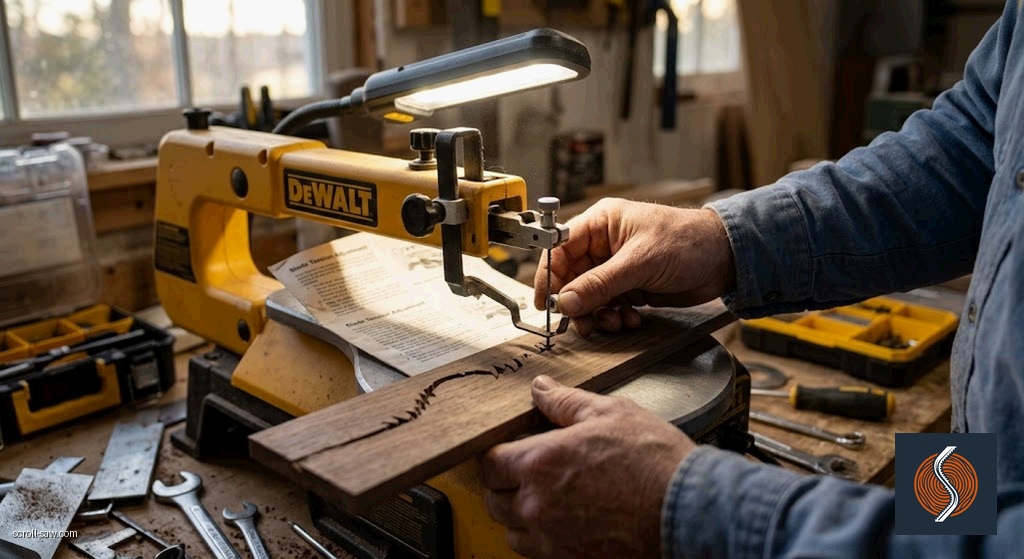
DeWalt Variable Speed Scroll Saw: What to Change When the Cut Quality Drops
You’re halfway through a fretwork piece, following a tight curve, and the blade starts chattering. The cut line wanders. The wood burns where it used to glide. You stop, check the pattern, and wonder if the saw is losing its edge or if you are missing something simple.
If you run a DeWalt variable speed scroll saw, the answer is almost always the second one. The DeWalt DW788 is built around a 1.3-amp motor and a double parallel-link arm design that holds up well over years of use. When the cut quality drops, the saw is telling you that one of five things has drifted out of spec. The good news is that all five are fixable at the bench without replacing the saw.
A variable speed scroll saw lets you match the blade stroke rate to the material and blade you are using. The DeWalt DW788 20 in variable speed scroll saw gives you a speed range that runs from roughly 400 to 1,800 strokes per minute. That range is not a luxury feature. It is the difference between a clean cut in hardwood and a burned, ragged mess.
Here is what to check, in order, when your DeWalt variable speed scroll saw starts producing cuts that are not up to the standard you expect.
Blade Tension: The First Suspect
The blade-tensioning lever on the DeWalt DW788 is front-mounted, which means you can adjust tension without walking around the saw. That convenience matters because tension is the single most common cause of cut quality loss.
When blade tension is too low, the blade flexes on the return stroke and cuts a wider kerf than the blade width. You get wandering cuts, especially on curves. When tension is too high, the blade snaps prematurely and you find yourself changing blades every few minutes instead of every few hours.
The right tension is firm but not locked. Pluck the blade like a guitar string. You should hear a clean ping, not a thud. If the blade deflects more than a quarter inch when you push it sideways with moderate finger pressure, it is too loose. The DeWalt DW788 variable speed scroll saw manual specifies a tension range, but most experienced operators go by feel after a few blades.
One thing that catches people: the tension changes as the blade wears. A blade that was correctly tensioned at the start of a session may need a half-turn more after an hour of cutting. If your cuts were clean at the beginning of a project and degraded halfway through, re-tension the blade before looking for any other cause.
Blade Selection: The Wrong Blade Will Never Cut Right
The DeWalt DW788 accepts both pin-end and plain-end blades, which gives you access to a wide selection. The mistake most people make is using one blade for everything.
For tight curves in thin stock (under 3/4 inch), you want a blade with a higher tooth count, typically a #2/0 or #3 skip tooth. For thicker stock (1 to 2 inches), a #5 or #7 blade with fewer teeth per inch will clear sawdust faster and cut straighter. The general rule: you need at least three teeth in the material at all times. Fewer than that and the blade grabs, tears, and wanders.
If you are doing inside-cut threading, the upper-arm lift on the DeWalt DW788 lets you thread the blade through a pilot hole without removing it from the clamps. That feature saves time, but it does not change the fact that you still need the right blade for the radius you are cutting. A #7 blade will not make a 1-inch radius cut no matter how patient you are.
The tool-free blade clamp on the DeWalt DW788 makes blade changes fast enough that there is no excuse for using the wrong blade. If you are switching between roughing cuts and finish cuts on the same piece, change the blade. It takes less than a minute.
Speed Setting: Match the Stroke Rate to the Cut
The variable speed control on the DeWalt DW788 is front-mounted, so you can adjust it while cutting. That is not a gimmick. Different materials and blade sizes need different stroke rates.
For thick hardwood (1.5 to 2 inches), run the saw at the low end of the range, around 600 to 800 strokes per minute. The slower stroke rate gives each tooth time to clear sawdust, which prevents burning. For thin stock and tight curves, a higher speed (1,200 to 1,600 SPM) produces a cleaner cut because the blade takes smaller bites more frequently.
The mistake that burns wood: running the saw too fast for a thick piece. The blade heats up, the wood scorches, and you get a black line that no amount of sanding fully removes. If you are seeing burn marks on oak or maple, drop the speed by 200 SPM and try again.
The DeWalt DW788 20 in. variable speed scroll saw gives you enough range to cover most materials, but the speed dial is not labeled with exact numbers on all versions. Get a feel for where the low, medium, and high settings fall, and pay attention to how the saw sounds. A blade that is cutting right makes a steady, even sound. A blade that is struggling or burning sounds labored.
Table Alignment and Bevel Cuts
The cast-iron table on the DeWalt DW788 tilts for bevel cuts, with 45-degree left bevel and 45-degree right bevel capability. When the table is not sitting at zero degrees, every cut you make will have an unintended bevel.
Check the table with a small square before starting a project, especially if you have recently tilted it for a bevel cut and returned it to flat. The bevel lock can look tight but still be a degree off. That single degree is enough to produce cuts that do not stack properly when you assemble a piece.
If your bevel cuts are coming out at the wrong angle, check two things. First, the bevel scale on the saw is a reference, not a precision instrument. Use a digital angle gauge if you need accuracy. Second, the bevel lock can slip under vibration if it is not fully tightened. The DeWalt DW788 has a solid bevel mechanism, but any mechanism can loosen over time.
Dust Management and the Flexible Dust Blower
The flexible dust blower on the DeWalt DW788 is a small tube that directs air at the cut line to clear sawdust. It looks like an afterthought, but it directly affects cut quality.
When sawdust builds up on the cut line, you cannot see where you are cutting. You compensate by cutting to the wrong side of the line, and the piece comes out wrong. Worse, packed sawdust in the kerf increases friction, which leads to burning.
Position the dust blower so it hits the cut line just ahead of the blade. Adjust it every time you change the blade or the material thickness. If the blower tube has lost its shape over time (and it will, because it is a flexible metal tube), bend it back into position carefully. A blower that points at the blade instead of the cut line does nothing useful.
For dust collection below the table, the DeWalt DW788 has a dust port that accepts a shop vacuum hose. Connecting a vacuum does more than keep your bench clean. It pulls sawdust out of the kerf from below, which reduces friction and burning on thick cuts.
The Double Parallel-Link Arm: What It Does and What to Watch
The double parallel-link arm design is the feature that separates the DeWalt DW788 from cheaper scroll saws. Two parallel arms hold the blade so that the stroke is vertical with minimal deflection. Cheaper single-arm designs push the blade forward on the downstroke and back on the upstroke, which produces a cut that angles through the material.
The parallel-link arms on the DeWalt DW788 stay accurate for years, but the pivots can develop play. If you grab the upper arm and push it forward and back, there should be almost no movement. If you feel clicking or looseness, the pivot bearings may need attention.
This is the one issue that is not a bench fix for most owners. If the parallel-link arms have developed play, the saw will produce cuts that angle through thick stock even with a fresh blade and correct tension. At that point, you are looking at a service issue, not an adjustment.
Stand Mounting and Vibration
The DeWalt DW788 is a heavy saw, but it still vibrates. If it is sitting on a flimsy bench, that vibration transfers into the workpiece and produces rough cuts that look like the blade is chattering.
Stand mounting is the answer. The DeWalt DW788 is designed to bolt to a stand, and a solid stand with rubber feet absorbs vibration that a lightweight bench amplifies. If you do not have the DeWalt stand, any heavy shop stand will work as long as you can bolt the saw down.
If you cannot use a stand, add rubber isolation pads under the saw feet and make sure the bench is not wobbling. The saw will tell you if vibration is the problem: the cut quality will improve noticeably when you press down on the table while cutting.
What to Check First: A Quick Summary
When cut quality drops on your DeWalt variable speed scroll saw, work through the list in order:
- Re-tension the blade. This fixes the problem most of the time.
- Check the blade size and tooth count against the material you are cutting.
- Drop the speed if you are burning, raise it if you are getting rough edges on thin stock.
- Square the table to zero degrees with a machinist square.
- Aim the dust blower at the cut line and connect a vacuum to the dust port.
If none of those fixes the problem, check the parallel-link arm pivots for play. If the arms are tight and the blade is right and the tension is right, you have done everything you can at the bench.
The DeWalt DW788 20 variable speed scroll saw is a tool that rewards attention. The front-mounted controls, the tool-free blade clamp, and the blade-tensioning lever all exist so you can make adjustments without stopping your work for long. The saw will cut clean for years if you give it the right blade, the right speed, and the right tension. When it stops cutting clean, it is almost always telling you that one of those three things has drifted. Listen to it, adjust, and get back to cutting.
Frequently Asked Questions
What speed should I run my DeWalt DW788 variable speed scroll saw at for hardwood? For hardwoods 1 to 2 inches thick, run the saw at 600 to 800 strokes per minute. Thicker stock needs slower speeds to give each tooth time to clear sawdust and prevent burning. For thin hardwood under 1/2 inch, 1,200 to 1,600 SPM produces cleaner edges.
Why does my DeWalt scroll saw burn the wood? Burning is caused by one of three things: speed too high for the material, blade tension too low (causing the blade to rub without cutting), or a dull blade. Drop the speed first, then check tension, then replace the blade if the first two do not fix it.
Can the DeWalt DW788 use pin-end and plain-end blades? Yes, the DeWalt DW788 accepts both pin-end and plain-end blades through its tool-free blade clamp system. Pin-end blades are easier to change, while plain-end blades give you access to a wider selection of sizes and tooth counts.
How do I know if the blade tension is correct on my DeWalt scroll saw? Pluck the blade like a guitar string. A correctly tensioned blade produces a clean ping. If it produces a dull thud, it is too loose. If you cannot flex it at all with moderate finger pressure, it may be too tight and could snap.
What does the double parallel-link arm do on the DeWalt DW788? The double parallel-link arm keeps the blade stroke vertical with minimal forward and backward deflection. This produces a cut that goes straight through the material instead of angling, which is a common problem on single-arm scroll saw designs.
Can I mount the DeWalt DW788 on any stand? The DeWalt DW788 is designed for stand mounting and will fit the DeWalt stand, but any heavy shop stand that accepts the bolt pattern will work. A solid stand reduces vibration, which directly improves cut quality.
Why are my bevel cuts coming out at the wrong angle? The bevel scale on the saw is a reference, not a precision instrument. Use a digital angle gauge to set the bevel angle, and make sure the bevel lock is fully tightened. The lock can slip under vibration if it is not tight.
How often should I change the blade on my DeWalt variable speed scroll saw? Change the blade when it stops cutting cleanly, when it starts burning the wood at a speed that used to work, or when you switch to a different material thickness. A blade used for hardwood may last 2 to 4 hours of cutting time, while a blade used for softwood may last longer.
References
- DeWalt DW788 Product Specifications, DeWalt Official Product Page
- Scroll Saw Blade Selection Guide, Fine Woodworking
- Occupational Safety and Health Administration, Woodworking Machinery Safety Standards (29 CFR 1910.213)
- Wood Database, Thermal Properties and Burning Characteristics of Common Hardwoods


