
Dremel Moto Shop Scroll Saw Blades: Better Cuts
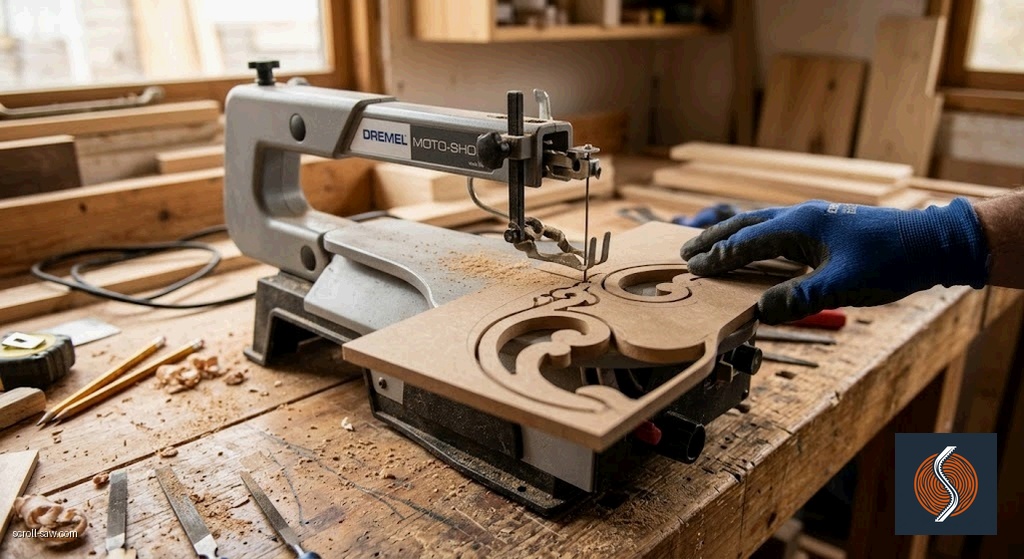
Getting Better Cuts With Dremel Moto Shop Scroll Saw Blades
You unbox the Dremel Moto-Saw, clamp it to the kitchen table, and make your first few cuts in a scrap piece of pine. The cuts are rough, the edges are fuzzy, and you wonder if the tool is the problem or if you are using the wrong blade. Nine times out of ten, it is the blade.
Dremel Moto Shop scroll saw blades are not all the same. The Moto-Saw (model MS20-01) ships with three blade types: MS51, MS52, and MS53. Each one is designed for a specific range of materials and cut types, and using the wrong one is the fastest way to get disappointing results from an otherwise capable tool.
The Dremel Moto-Saw is a compact scroll saw that works in two modes. In stationary mode, you clamp it to a table with the base clamp and use it like a benchtop scroll saw. In handheld mode, you detach the saw from the base and use it as a coping saw. The auto-tensioning mechanism keeps the blade at consistent tension in both modes, which is one less thing to worry about. But the blade choice is still on you.
Here is what each Dremel Moto Shop scroll saw blade does well, what it does poorly, and how to get the best cuts from each one.
The Three Blades: MS51, MS52, and MS53
The MS51 blade is the general-purpose wood cutting blade. It has a medium tooth count that handles softwoods and thin hardwoods up to about 1/2 inch. If you are cutting pine, cedar, or plywood for craft projects, the MS51 is your starting point. Its weakness is thick hardwood. Push it through a 1-inch piece of oak and it will struggle, heat up, and produce ragged edges.
The MS52 blade has fewer teeth per inch and a larger tooth profile. It is designed for thicker and harder materials. If you are cutting hardwoods, dense plastics, or laminates, the MS52 clears sawdust faster and keeps the cut cooler. The tradeoff is that it leaves a rougher surface on thin stock, where the large teeth tear the wood fibers instead of slicing them.
The MS53 blade is the fine-tooth option. It is for tight curves, thin materials, and detail work. If you are cutting intricate patterns in thin plywood or making small decorative pieces, the MS53 gives you the cleanest edges and the tightest turning radius. Its weakness is thick material. The fine teeth pack with sawdust and the blade stalls or burns.
If you are getting poor cuts, ask yourself which blade you are using and whether it matches the material. The most common mistake is using the MS51 for everything. It is a good general blade, but it is not the right blade for every job.
Tooth Geometry: Why It Matters More Than Brand
The difference between a clean cut and a ragged one often comes down to tooth geometry, not blade brand. Scroll saw blades come in two main tooth patterns: regular tooth and skip tooth.
Regular tooth blades have teeth set at a standard spacing. They produce a smoother cut but cut slower and are more prone to burning in thick material because the sawdust has nowhere to go.
Skip tooth blades have a gap between each tooth. That gap gives sawdust a place to exit the kerf, which keeps the cut cooler and reduces burning. The tradeoff is a slightly rougher cut surface.
The Dremel MS51 and MS53 blades use a regular tooth pattern, while the MS52 uses a skip tooth pattern. That is why the MS52 handles thick material better: it clears sawdust instead of packing it.
If you are burning wood with the MS51, switching to the MS52 may fix the problem even though the MS52 is a rougher blade. The burn is not caused by the blade being too rough. It is caused by sawdust friction, and the skip tooth pattern solves that.
Speed Setting and the Quick Change Lever
The Dremel Moto-Saw has variable speed, which you adjust with a dial on the body. The speed range runs from a slow setting for plastics and thin metals to a faster setting for wood.
For wood cutting with the MS51 or MS53, a medium to high speed works well. For plastic cutting and laminate cutting, drop the speed. Plastics melt at high blade speeds, and a melted cut is worse than a rough one. If you are cutting acrylic or polycarbonate, run the saw at the low end and let the blade do the work without forcing it.
The Quick Change lever on the Moto-Saw makes blade swaps fast. You flip the lever, pull the old blade, insert the new one, and flip the lever back. The auto-tensioning mechanism takes care of the rest. There is no manual tension adjustment, which means you cannot overtension or undertension the blade. That removes one variable from the cut quality equation, but it also means you cannot fine-tune tension for specialty work.
If you are switching between materials during a project, use the Quick Change lever. It takes 10 seconds. There is no reason to push a wood blade through plastic or a fine blade through thick stock.
Stationary Mode vs. Handheld Mode: Does It Affect Cut Quality?
Yes, it does, and the difference is noticeable.
In stationary mode, the Moto-Saw is clamped to a table with the base clamp. The workpiece rests on the table surface, and you feed it into the blade. This gives you the most control because the saw is fixed and you only have to manage the workpiece. For straight cuts, use the parallel guide, which attaches to the base and acts as a fence.
In handheld mode, you hold the saw and move it through the workpiece, like a coping saw. This gives you freedom to cut anywhere, but you lose the table support. Cuts in handheld mode tend to be less consistent because you are managing both the saw and the workpiece with your hands.
For the best cuts, use stationary mode whenever you can. The base clamp holds the saw steady, the table supports the workpiece, and the parallel guide keeps straight cuts straight. Save handheld mode for situations where you cannot bring the workpiece to the bench, like trimming a piece that is already installed.
Feed Rate: The Variable Nobody Talks About
Blade choice and speed get all the attention, but feed rate is the variable that catches most people. Feed rate is how fast you push the workpiece into the blade.
If you push too fast, the blade cannot clear sawdust, it heats up, and the cut burns. If you push too slow, the blade rubs without cutting, which also produces heat and burning. The right feed rate is steady and moderate. You should feel light resistance, not a fight.
The Dremel Moto-Saw has a motor that is adequate for its size but will not power through thick material the way a full-size scroll saw will. If you feel the saw slowing down as you feed, you are pushing too hard. Back off and let the blade cut at its own pace.
A good test: make a straight cut in scrap material at your normal feed rate. Then make the same cut at half that speed. If the second cut is cleaner, your feed rate is the problem, not the blade.
Common Problems and Their Fixes
Rough edges on thin plywood: Switch from MS52 to MS53. The finer teeth slice wood fibers instead of tearing them.
Burning on hardwood: Switch from MS51 to MS52. The skip tooth clears sawdust and reduces friction. Also check your speed and feed rate.
Plastic melting: Drop the speed to the low setting and use the MS51 or MS52. Do not force the feed. Let the blade cut slowly.
Blade breaking: The auto-tensioning mechanism should prevent this, but if you are forcing the blade through tight curves, you are putting lateral stress on it. Use a finer blade (MS53) for tight curves instead of forcing a coarser blade.
Wandering cuts in handheld mode: Switch to stationary mode and use the parallel guide for straight cuts. For curves, clamp the workpiece to the table and rotate it into the blade.
The Verdict
The Dremel Moto-Saw is a capable compact tool, but it is blade-sensitive. Getting the best results from Dremel Moto Shop scroll saw blades comes down to matching the blade to the material. The MS51 is your default for wood, the MS52 for thick or hard materials, and the MS53 for fine detail work. If you are getting bad cuts, the blade is the first thing to change, the speed is the second, and the feed rate is the third.
The auto-tensioning mechanism and Quick Change lever make this the easiest scroll saw to adjust. You cannot mess up the tension, and you can change blades in seconds. That means there is no excuse for using the wrong blade for the job.
If you are doing craft work in thin wood, the MS53 will give you the cleanest cuts. If you are cutting thicker stock, the MS52 will keep the cut cool. If you are not sure, start with the MS51 and adjust from there. The blades are inexpensive enough that you should have all three on hand, and the Quick Change lever means switching takes less time than reading this paragraph.
Frequently Asked Questions
What size blades does the Dremel Moto-Saw use? The Dremel Moto-Saw (MS20-01) uses MS51, MS52, and MS53 blades. These are proprietary Dremel scroll saw blades designed specifically for the Moto-Saw and are not interchangeable with standard pin-end or plain-end scroll saw blades.
Can I use regular scroll saw blades in the Dremel Moto-Saw? No. The Moto-Saw uses a proprietary blade mount with the auto-tensioning mechanism. Standard scroll saw blades will not fit. You must use Dremel MS-series blades.
What is the best blade for cutting wood with the Dremel Moto-Saw? For general wood cutting, the MS51 is the best starting point. For thicker or harder woods, switch to the MS52. For fine detail work in thin wood, use the MS53.
How do I change the blade on the Dremel Moto-Saw? Flip the Quick Change lever to release the blade, pull the old blade out, insert the new blade, and flip the lever back. The auto-tensioning mechanism sets the tension automatically. No tools are required.
Why is my Dremel Moto-Saw burning the wood? Burning is usually caused by a feed rate that is too fast, a speed setting that is too high, or a blade that is too fine for the material thickness. Try switching to the MS52 (skip tooth) for thicker wood, and reduce your feed rate.
Can the Dremel Moto-Saw cut plastic? Yes. Use the MS51 or MS52 blade at a low speed setting. Do not force the feed, as plastics melt at high blade speeds. Acrylic and polycarbonate cut well at slow speeds with moderate feed pressure.
What is the difference between stationary mode and handheld mode on the Moto-Saw? In stationary mode, the saw is clamped to a table with the base clamp and the workpiece is fed into the blade. In handheld mode, the saw is detached from the base and used like a coping saw. Stationary mode gives more control and cleaner cuts.
How do I keep straight cuts straight with the Dremel Moto-Saw? Use the parallel guide, which attaches to the base in stationary mode and acts as a fence. Without the parallel guide, maintaining a straight line in handheld mode is difficult.
References
- Dremel Moto-Saw (MS20-01) Product Page and Blade Specifications, Dremel Official Website
- Scroll Saw Blade Basics, Fine Woodworking
- Plastics Machining and Finishing Guide, Society of Plastics Engineers
- Consumer Product Safety Commission, Power Tool Safety Guidelines


