
How to Change Blade on WEN Scroll Saw
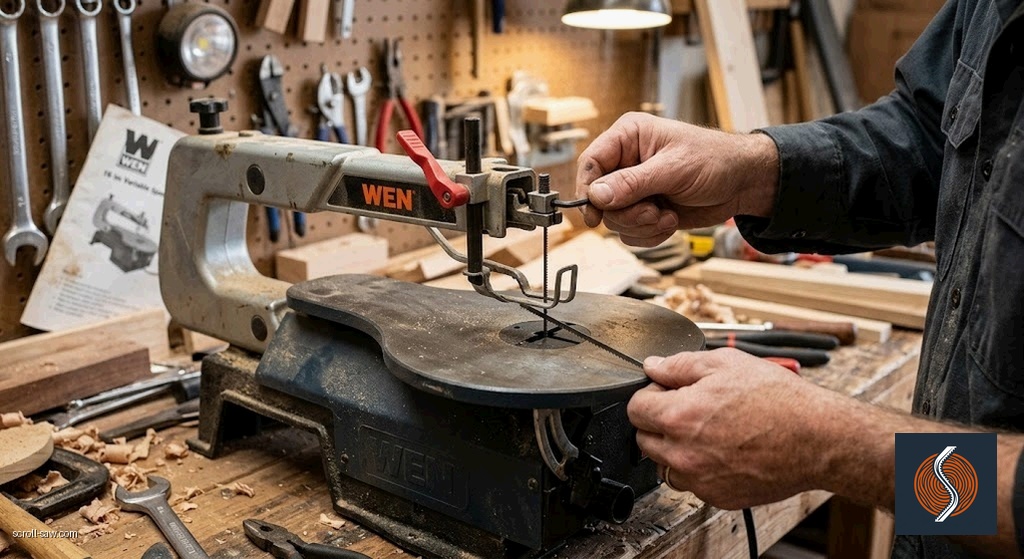
How to Change Blade on WEN Scroll Saw: A Practical Scroll-Saw Guide
The WEN 3921 sat on my workbench for three weeks before I tried to cut anything with it. When I finally did, the first blade change took twenty minutes and a lot of head-scratching. The two-direction blade mounting system, the thumbscrew blade adapter, the air pump hose, and the flex light all got in my way. If you’re staring at your WEN scroll saw wondering why the blade won’t go in straight, you’re not alone. Here is how to change blade on WEN scroll saw units without the confusion I went through.
The WEN 3921 is a 16-inch scroll saw with a cast-iron base, variable speed from 400 to 1600 SPM (strokes per minute), and a 9/16-inch stroke length. It has a two-inch cutting capacity, a 16-by-10-inch table that bevels 45 degrees to the left, and a unique two-direction blade mounting system that lets you install the blade in a standard or 90-degree position.
The blade change process: unplug the saw, loosen the upper and lower blade clamps (or the thumbscrew blade adapter if you’re using pinless blades), remove the old blade, install the new one with teeth pointing down, tighten, set tension, and test. The thumbscrew adapter and two-direction mounting are the two features that confuse people most.
How to Change Blade on WEN Scroll Saw: The Practical Method
1. Unplug and Prep
Unplug the saw. Clear the table. The WEN 3921 has a 16-by-10-inch table, which is decent for a saw in this class, but it still collects clutter quickly. Make sure the flex light is moved out of the way and the air pump hose isn’t tangled with the blade. Check that the foot-lock clamp securing the saw to your workbench is tight before you start.
2. Remove the Table Insert
Lift out the table insert. The WEN uses a standard insert plate that surrounds the blade opening. Set it aside.
3. Determine Your Blade Type
This is where the WEN 3921 differs from most scroll saws. It accepts both pin-end and pinless (plain-end) blades, and the method differs depending on which type you’re using.
For pin-end blades: loosen the upper and lower blade clamps directly. The pins seat into the blade holder slots.
For pinless blades: install the thumbscrew blade adapter first (if it’s not already in place), then loosen the thumbscrews to release the blade. The adapter converts the pin-end holder to accept plain-end blades, which gives you access to the full range of scroll saw blades on the market.
4. Loosen the Blade Clamps or Thumbscrew Adapter
For pin-end blades: loosen the upper blade clamp and the lower blade clamp. Turn the fasteners counterclockwise.
For pinless blades using the thumbscrew adapter: loosen the thumbscrews on both the upper and lower adapter. The thumbscrews are designed to be turned by hand, which is easier than using an Allen wrench or a small wrench on the standard clamps.
5. Remove the Old Blade
Slide the old blade out. It should come free with no resistance. If it doesn’t, check that both clamps or both thumbscrews are fully loose.
6. Choose Your Blade Direction
Here’s where the WEN 3921’s two-direction blade mounting comes into play. You can install the blade in two positions:
Standard position: the blade runs front to back, which is the normal orientation for scroll saw cutting. Use this position for most projects.
90-degree position: the blade runs side to side. This orientation lets you cut longer pieces that would otherwise hit the back of the saw’s frame. If you’re cutting a long board, the 90-degree position gives you more clearance.
Most blade changes use the standard position. Only switch to the 90-degree position when you have a specific piece that needs the extra clearance.
7. Install the New Blade
Slide the new blade into the lower holder first, teeth pointing down and toward the back of the saw (or toward the side if you’re using the 90-degree position). Seat the blade fully.
For pin-end blades: seat the pins into the slots. For pinless blades: push the blade all the way into the thumbscrew adapter jaws.
Tighten the lower clamp or thumbscrew first, then the upper. The blade should be straight.
8. Set Tension
Turn the tension knob on the upper arm. Pluck the blade. You want a clear, high ping. The blade should flex slightly when pressed sideways but not more than a quarter inch.
The WEN 3921’s tension mechanism is straightforward. Turn clockwise to increase, counterclockwise to decrease. If the blade sounds shrill or the arm bows, back off.
9. Replace the Insert and Test
Put the table insert back. Plug in the saw. The WEN 3921 has a variable speed range from 400 to 1600 SPM. Start at a middle setting, around 800 to 1000 SPM, and run the saw without cutting for a few seconds. Make a test cut in scrap material.
The Thumbscrew Blade Adapter and Pinless Blades
The thumbscrew blade adapter is one of the best features of the WEN 3921, and it’s also one of the most confusing for new owners.
The adapter is a small metal piece that converts the pin-end blade holder to accept plain-end (pinless) blades. It clamps onto the blade holder and uses thumbscrews to secure the blade instead of the standard clamp mechanism.
Here’s why it matters: plain-end blades come in a much wider range of sizes and tooth counts than pin-end blades. If you only use pin-end blades, you’re limited to a handful of sizes. With the thumbscrew adapter, you can use any standard scroll saw blade, which opens up your options for fine fretwork, metal cutting, and specialized applications.
The tradeoff is that the adapter adds a small amount of complexity to the blade change. You have two extra thumbscrews to deal with, and the adapter can occasionally shift in the blade holder if it’s not seated properly. If you notice the adapter moving during a cut, remove it, clean the blade holder, and reinstall it.
If you switch between pin-end and pinless blades frequently, keep the adapter in a labeled bag near the saw. It’s small and easy to lose. The onboard blade storage is a convenient place to keep spare blades, but the adapter itself fits better in a separate labeled container.
Two-Direction Blade Mounting Explained
The two-direction blade mounting system is unique to the WEN 3921 in this price range. It lets you rotate the blade 90 degrees from the standard front-to-back orientation to a side-to-side orientation.
When to Use the 90-Degree Position
The 90-degree position is for long workpieces. In the standard position, the depth of the saw’s frame limits how long a piece you can cut. The blade runs front to back, and the frame behind the blade creates a physical limit. If your workpiece is longer than the throat depth allows, you’re stuck.
In the 90-degree position, the blade runs side to side. The frame is now to the side of the blade, which means you can feed a long board through from front to back without hitting the frame. This is useful for cutting long, narrow pieces like trim, molding, or sign blanks.
When to Stay in Standard Position
For 90 percent of scroll saw work, the standard position is correct. Intricate curves, fretwork, interior cuts, and most project work all use the standard front-to-back blade orientation. Only switch to the 90-degree position when you have a specific long piece that won’t fit in the standard orientation.
How to Switch Directions
To switch from standard to 90-degree (or back), you need to remove the blade, rotate the blade holder assemblies, and reinstall the blade. The WEN 3921’s blade holders are designed to rotate, but the process takes a few minutes. Plan ahead and set up the direction you need before you start cutting.
Setting Tension and Speed on the WEN 3921
Tension
The WEN 3921 uses a standard tension knob on the upper arm. Turn clockwise to increase tension, counterclockwise to decrease. The pluck test works the same as on any scroll saw: a clear ping means good tension, a dull thud means too little, a shrill sound means too much.
One thing specific to the WEN: the cast-iron base reduces vibration compared to lighter saws, which means tension problems are easier to feel. If the blade chatters, you’ll feel it through the table more clearly than on a lighter saw. Use that feedback to dial in tension.
Speed
The variable speed range of 400 to 1600 SPM gives you plenty of room to work. Here’s what I’ve found works:
For thin plywood and delicate fretwork: 400 to 600 SPM. Slow speed gives you control and prevents burning. For general wood cutting in 1/4 to 1/2 inch stock: 800 to 1200 SPM. This is the sweet spot for most projects. For thick stock (3/4 inch and up): 1200 to 1600 SPM. Higher speed helps the blade power through thicker material. For plastic and laminate: 400 to 600 SPM. Slow speed prevents melting.
The air pump helps keep the cut line clear of sawdust, which is especially helpful at lower speeds where the sawdust doesn’t get blown away by blade motion alone. Make sure the air pump hose is positioned to blow sawdust away from your layout line.
Common Issues: Blade Alignment and Angle Problems
My WEN Scroll Saw Blade Is on an Angle
This is one of the most common complaints about the WEN 3921, and it usually has one of two causes.
First, the blade isn’t seated properly in the clamps. If the blade is crooked in the holder, it will cut at an angle. Remove the blade, clean the clamp jaws, and reinstall it carefully, making sure it’s straight before tightening.
Second, the thumbscrew adapter is misaligned. If you’re using the adapter for pinless blades and it’s not seated squarely in the blade holder, the blade will sit at an angle. Remove the adapter, clean the holder, and reinstall it carefully.
Blade Alignment Drifts During Cutting
If the blade starts straight but drifts to an angle during a cut, the clamps or thumbscrews are loosening under vibration. Tighten them more firmly, or check whether the threads are worn. The onboard blade storage is handy for keeping spare blades close, but check that vibration from the saw isn’t loosening the stored blades into the mechanism.
The Flex Light and Air Pump Get in the Way
The flex light and air pump are useful features, but they can interfere with blade changes if they’re positioned poorly. Before you start a blade change, swing the flex light out of the way and reposition the air pump hose so it’s not near the blade holder. The 1-1/2-inch dust port on the side of the saw can also get in the way if you need to access the lower blade clamp from that side.
Conclusion
The WEN 3921 is a capable scroll saw with features that punch above its weight class. The cast-iron base reduces vibration, the variable speed range handles everything from delicate fretwork to thick stock, and the two-direction blade mounting solves the throat-depth problem for long pieces. The thumbscrew blade adapter gives you access to the full range of plain-end blades, which is the feature that makes this saw genuinely versatile. When you know how to change blade on WEN scroll saw units, the process takes three minutes: unplug, loosen, swap, tighten, tension, test. The two features that confuse people most, the thumbscrew adapter and the two-direction mounting, are also the two features that make this saw worth owning. Learn them, and the rest is easy.
FAQ
How do I change the blade on a WEN 3921 scroll saw? Unplug the saw, remove the table insert, loosen the upper and lower blade clamps (or thumbscrew adapter for pinless blades), remove the old blade, install the new one with teeth pointing down, tighten, set tension, and test.
What is the thumbscrew blade adapter on the WEN scroll saw? The thumbscrew adapter converts the pin-end blade holder to accept pinless (plain-end) blades. It lets you use any standard scroll saw blade, not just pin-end blades. Install it in the blade holder and use the thumbscrews to secure the blade.
What is two-direction blade mounting on the WEN 3921? The WEN 3921 lets you install the blade in a standard front-to-back position or rotate it 90 degrees to a side-to-side position. The 90-degree position gives you more clearance for cutting long pieces.
Why is my WEN scroll saw blade on an angle? The blade is probably not seated properly in the clamps, or the thumbscrew adapter is misaligned. Remove the blade, clean the clamp jaws, reinstall the blade carefully, and make sure it’s straight before tightening.
What speed should I use on the WEN 3921? For delicate work, use 400 to 600 SPM. For general cutting, 800 to 1200 SPM. For thick stock, 1200 to 1600 SPM. For plastic, 400 to 600 SPM to prevent melting.
Can I use pinless blades on the WEN 3921? Yes, with the thumbscrew blade adapter. The adapter converts the pin-end holder to accept plain-end blades, which gives you access to a wider range of blade sizes and tooth counts.
How do I set blade tension on the WEN scroll saw? Turn the tension knob on the upper arm clockwise to increase tension. Pluck the blade and listen for a clear, high ping. The blade should flex slightly when pressed sideways. If it sounds shrill or the arm bows, back off.
References
- WEN 3921 operator manual, blade installation, two-direction mounting, and thumbscrew adapter specifications.
- OSHA Machine Guarding standards, 29 CFR 1910.212, power tool safety requirements.
- Scroll Saw Woodworking and Crafts, blade selection and tensioning guidelines.
- Fine Woodworking, scroll saw techniques and blade alignment troubleshooting.


