
Finding the Correct Proxxon Scroll Saw Manual and Type Number
Finding the Correct Proxxon Scroll Saw Manual and Type Number
Proxxon is one of the easier tool brands to get documentation from. The website carries current manuals as PDFs, and the service network responds to email requests within a business day. What complicates things slightly is that the DSH line has quietly revised over the years, and pulling the wrong PDF, while not catastrophic, will show you a parts diagram that does not match your saw.
This piece walks through the identification steps and the service channels that actually work.
What the manual covers
A Proxxon scroll saw manual is a compact document, usually 16 to 24 pages. It contains safety notes, setup instructions, blade change procedure, tilt and speed adjustment, an exploded parts diagram, and a numbered parts list. On the DSH/E, the manual also includes wiring guidance for the electronic variable-speed controller.
The parts diagram is the section owners return to. It shows every replaceable component and keys each to a Proxxon part number, which the service network uses for orders.
Direct answer: the fastest path to the right manual
Read your saw first.
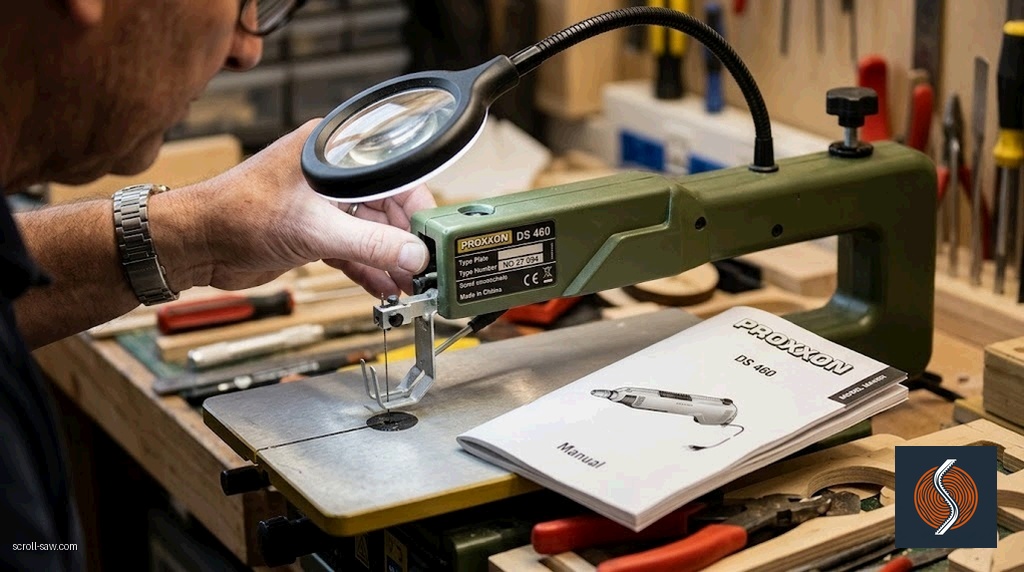
Check the badge on the housing. It will say DSH or DSH/E. If it says only Proxxon Scroll Saw with no model suffix, the saw is likely a very early two-speed unit.
Look for a type or model designation near the badge. This is often a numeric code such as 27088 or 28092, printed on the specification plate on the base.
Record the serial number, usually on the same specification plate.
With those three details, go to proxxon.com and use the product search. Select the DSH or DSH/E product page, then the downloads or documentation link. Download the manual PDF listed for your model number.
If your model number is not in the current downloads list, email Proxxon customer service in your region (US or European Proxxon distributor) with your photograph. They will send the archived PDF.
Reading the revision line
Proxxon manuals include a revision indicator on the back cover or the final page. It is usually a small alphanumeric code such as V01/2019 or Rev 3.
The most important reason to check this is the parts diagram. The DSH/E controller board has changed at least once, and the switch layout on the two-speed DSH changed on later units. If the diagram you are looking at does not match the physical layout of your saw, you have the wrong revision.
Using the manual for parts
Match the item you want to a numbered position on the exploded diagram. Read the part number from the accompanying list. Give that part number, your model designation, and your saw’s serial number to the Proxxon parts desk.
For items still stocked, this process is fast and reliable. Proxxon’s part availability on both the DSH and DSH/E remains strong.
For items that have been superseded, the parts desk will substitute the current equivalent. Ask them to confirm the substitution before shipping.
Common mistakes
Downloading a manual from a general search result. Older PDFs are still in circulation and often show earlier revisions.
Assuming DSH and DSH/E manuals are interchangeable. They are not. The variable-speed section and controller diagram are different.
Ordering without a serial number. The parts desk may accept it, but revision-specific items will require confirmation.
When the saw came without a manual
Used Proxxon scroll saws often arrive with no documentation. This is not a problem. Photograph the badge and specification plate, email Proxxon service, and expect the correct PDF within one business day.
Ask in the same email whether any known service items exist for your revision. The service desk is helpful with this and often mentions minor updates worth doing at the same time.
Verdict and takeaways
-
Proxxon documentation is well organized and current on the manufacturer website.
-
Identify your saw as DSH or DSH/E, note the model number, and record the serial before searching.
-
The DSH and DSH/E have separate manuals; do not use one for the other.
-
For older units or missing PDFs, Proxxon customer service is responsive.
Frequently asked questions
Where do I download the Proxxon DSH/E manual? From the Proxxon product page for the DSH/E, under downloads or documentation.
Is the two-speed DSH manual still available? Yes, through Proxxon customer service on request. It is not always listed on the current downloads page.
Does the manual include a wiring diagram? The DSH/E manual includes wiring guidance for the controller. The two-speed DSH manual has a simpler switch schematic.
Where is the serial number located? On the specification plate, usually on the base or the rear of the body.
Can Proxxon send a paper manual? Only a PDF. Paper manuals are not offered.
Is the manual required for parts orders? Recommended but not required. Model designation and serial number are the essentials.
References
-
Proxxon product documentation library, current downloads.
-
Proxxon US and European customer service, manual archive.
-
Owner reports on documentation access, model-building forums 2022-2026.


