
PCB370SS Scroll Saw: Setup and Technique Guide
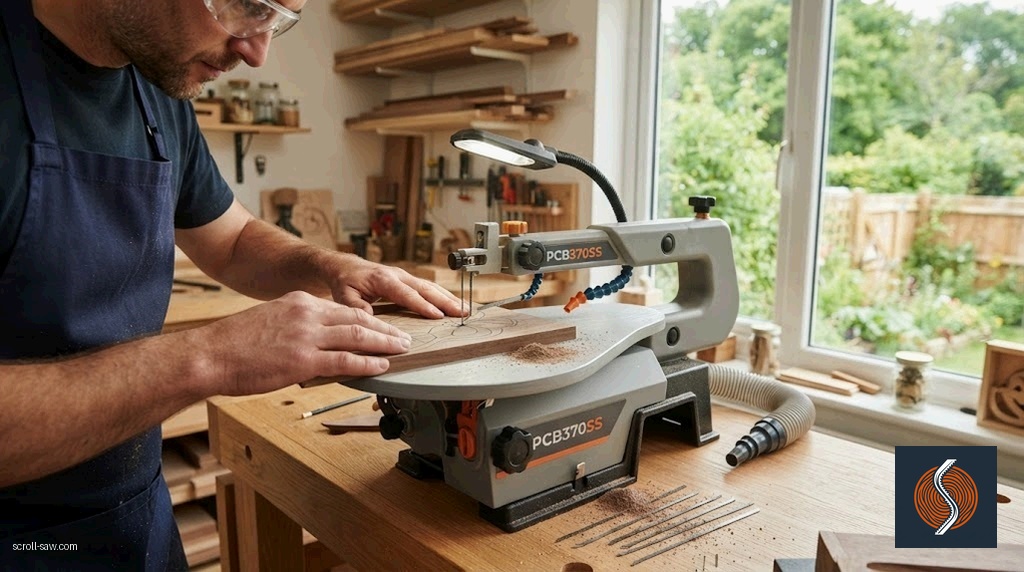
PCB370SS Scroll Saw: Setup and Technique Guide
The PCB370SS is one of those model codes that shows up on scroll saws sold under various house brands, particularly in the UK and continental Europe. The “370” refers roughly to the 370 mm (about 14.5 inch) throat capacity, the “SS” indicates a scroll saw variant, and the whole designation points to a compact hobby-class machine that shares its underlying design with several other budget imports of the same era.
Here’s how to get consistent, useful cuts out of a PCB370SS, whatever brand name is printed on the base.
What a PCB370SS actually is
A PCB370SS is a compact, C-arm scroll saw in the 14 to 15-inch throat class. Typical specifications:
-
Cast metal table with tilt from 0 to 45 degrees on most versions.
-
Modest single-speed or variable-speed universal motor.
-
Pin-end blade clamps on most versions.
-
Roughly 50 mm (about 2 inch) maximum cutting thickness at 90 degrees.
-
Standard hold-down foot, dust blower tube, and small work light.
Build quality varies noticeably between branded versions. The underlying casting and mechanism are similar, but the fit of blade clamps, the tightness of the tilt lock, and the smoothness of the tension mechanism differ from one manufacturer to the next.
Set the expectation before setting the machine
The PCB370SS is a compact entry-level scroll saw. It’s designed for occasional hobby use in stock up to about 3/4 inch, with modest expectations for stroke smoothness and blade change convenience. Set up well and paired with quality blades, it does exactly that job. Pushed beyond its class or set up carelessly, it disappoints.
The useful mindset: this is a saw that rewards a careful hour of setup with reliable service afterward.
Setup that matters
With the saw unplugged:
Bolt it down. PCB370SS-class saws are light enough to walk across a bench under vibration. Bolt to a heavy bench or a dedicated stand. Rubber pads under the feet reduce noise and vibration transfer.
Level the table to the blade. Set to zero degrees on the tilt scale, then verify with a small engineer’s square against the blade at three points along the stroke. All three readings should match. Adjust the underside stop screw if the scale zero doesn’t equal true square.
Check blade holder condition. The clamping surfaces should be flat and unscored. Worn holders let the blade rock at each end of the stroke and every cut wanders.
Verify the tilt lock. Set to 45 degrees, tighten, push firmly at each corner. If it moves, the lock is worn.
Test the tension mechanism through its full range. Smooth operation means the linkage is intact. Grit or wear produces inconsistent blade tension and premature breakage.
Check speed control for variable-speed versions. Smooth ramp up and down through the full range, no whining or hunting.
Set the hold-down foot lightly on the workpiece, close to but not touching the blade.
Aim the dust blower at the cut line, upstream of the direction of travel.
Blade choice
Blade selection matters more than the machine itself for the outcome quality.
For pin-end PCB370SS versions, standard 5-inch pin-end blades fit. A general pin-end assortment in mixed TPI covers everyday needs.
For plain-end versions (some later revisions):
-
Reverse-tooth #5 or #7 for general 1/4 to 3/4-inch wood: Olson’s reverse-tooth assortment.
-
Skip-tooth #1 or #3 for detail: Pegas skip-tooth blades.
-
Spirals for cuts that change direction: Olson SP46500 spirals.
If you have a pin-end PCB370SS and want to use plain-end blades, aftermarket pinless blade adapters (small clips that fit in the pin-end holders) are usually the most impactful single upgrade.
Tensioning correctly
Set by feel and sound, not by lever position. Pluck the tensioned blade with a fingernail near its middle. A clear ringing musical note means correct tension. A dull thud means too loose. A rising pitch that won’t settle means overtight, and the blade will snap early.
Technique for a compact scroll saw
Feed steadily, not aggressively. The modest motor doesn’t respond well to hard feed pressure. Firm, consistent pressure gets better results.
Rotate the workpiece around the blade. Never steer by twisting the wood sideways. Lateral pressure bends the blade and produces angled cuts.
Match speed to the cut. Long straight or gentle-curve runs at higher speed. Tight corners and delicate work at slower speeds.
Use starter holes for interior cuts. A small pilot hole in the waste area lets you thread the blade through cleanly.
Support long stock. An auxiliary support at exact table height prevents lift on overhanging pieces.
Take breaks on long sessions. Compact scroll saws run hotter than heavier machines. If the motor case is too hot to touch, pause for fifteen minutes.
Common problems and their causes
Blade snaps often. Over-tensioning, side-loading during cutting, or wrong blade for the material.
Cut wanders. Bent blade, dull blade, uneven blade holder grip, or lateral steering pressure.
Loud vibration. Loose motor mount, loose base bolts, stretched belt.
Motor bogs in hardwood. Feed slower or switch to a coarser blade.
Workpiece lifts on upstroke. Hold-down foot too high, over-tensioned blade, or coarse pin-end blade at high speed.
Where the PCB370SS shines and where to hand off
Hobby-scale work in soft to medium hardwood, up to about 3/4 inch, sits comfortably in the machine’s zone. Puzzles, silhouettes, small signs, ornaments, and craft cutouts.
Hand off to another tool when the work becomes production-scale, when stock is regularly over an inch thick (band saw is faster), when detail becomes extremely fine, or when the workpiece exceeds the 14-inch throat capacity.
The verdict
A PCB370SS is an honest entry-level scroll saw. Not a lifelong companion, not a bench ornament. Tuned carefully and fed quality blades, it produces work suited to casual use at a price that lets you invest the difference in consumables and a good stand. If you outgrow it, that’s a signal to move to a heavier 16 or 18-inch class saw with modern conveniences, not a failing of the PCB370SS.
FAQ
What does PCB370SS mean? A model code shared across several house-brand versions of a compact 14 to 15-inch scroll saw. The 370 refers roughly to throat capacity in millimetres.
What blade does a PCB370SS use? Most versions take standard 5-inch pin-end blades. Some later versions take plain-end blades. Check the blade holder.
How thick can it cut? Roughly 50 mm (2 inches) in soft wood at 90 degrees. Comfortable everyday range is 1/8 to 3/4 inch.
Is it worth buying used? At a low price, if the arm has no lateral play and the blade holders are unmarked. Modern equivalents outperform it, so pricing should reflect the class and age.
Where do I find a manual? With the specific manufacturer’s support resources. Aggregator sites and forums are the usual fallbacks. A general scroll saw manual covers the operational fundamentals.
Why does my blade break so quickly? Over-tensioning is the most common cause. Check tension by feel: a clear ringing note when plucked, not a dull thud or a straining high pitch.
Can I upgrade a PCB370SS with plain-end blade capability? Aftermarket pinless blade adapters exist for many pin-end scroll saws. Check compatibility with your specific model.
Is a PCB370SS good for a beginner? Works for that role if the price is right and the machine is mechanically sound. A modern entry-level saw with tool-free blade change is easier to learn on.
References
-
Olson Saw Company blade selection and tensioning technical resources.
-
Scroll Saw Association of the World, operating and safety guidance.
-
Fine Woodworking magazine archive, scroll saw setup articles.
-
General industrial supplier resources for consumables.
Title tag: PCB370SS Scroll Saw: Setup and Technique Guide Meta description: How to set up, blade, and get clean results from a PCB370SS scroll saw, with the technique habits that make a compact machine cut like a bigger one. URL slug: pcb370ss-scroll-saw Excerpt: The PCB370SS is a compact hobby scroll saw sold under several brand names. Here’s how to set it up, choose blades that match its class, and use technique to get results the machine alone can’t deliver.


